Crusty
Crusty
Starting Point: LeRobot and ACT
In 2025, HuggingFace released LeRobot, which is a framework that aims to provide models, datasets, and tools for real-world robotics in PyTorch. One interest aspect was that they released projects for low-cost open source robot arms. This was a trend that I had been seeing for a while (ALOHA), with many open-source projects for low-cost robot arms being released in the past few years. I decided to build my first personal robot arm, based on the Koch open arms. The Koch arm is a 6-DOF arm that can be built for around $200, and it has a lot of documentation and support available online. I built the first leader-follower pair in the Summer and started testing some of the available imitation learning algorithms on it. My goal was understanding how much these models could understand a sequence of tasks.
My initial experiment was: I would hide two objects under pieces of fabric and have the follower arm “discover” them by dragging the fabric around. Later the idea was that the policy would pick the correct object and place it in a bin. I wanted to see if the follower could learn to find the objects and then pick them up. I was able to train a policy in which the follower was able to learn to find the objects and pick them up, even when the objects were hidden under the fabric. All of that with 20 minutes of demonstrations! The training time was relatively long (~4 hours), but the results were promising.
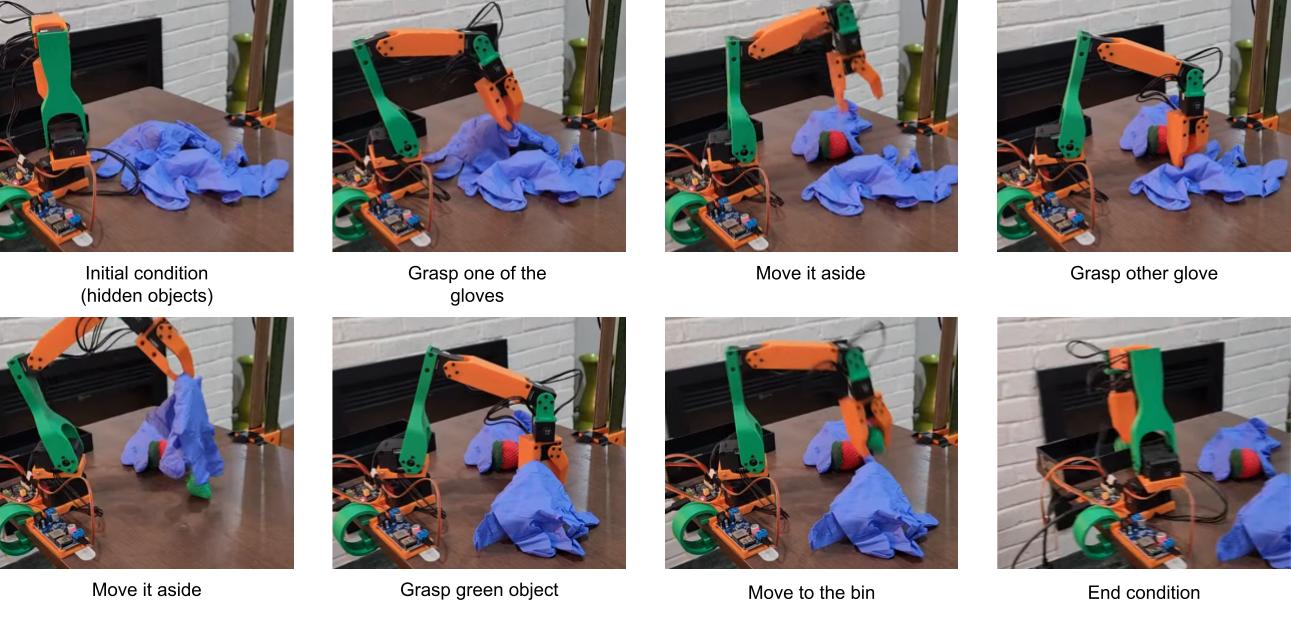 Explore/pick sequence policy with LeRobot + Koch v1.1 + ACT.
Crusty, the Robot
So this year I decided to build a full robot as a personal testing platform from ground up. My goal is to have a testing platform to perform manipulation tasks through imitation learning and a mobile base that can used to test navigation algorithms to move across relevant locations in the environment. Crusty has two main components: the bi-manual manipulation system and the mobile base. The manipulation system consists of two 6-DOF arms, considering a gripper at the end. The arms are designed to be lightweight and dexterous, with a payload capacity of around 100g. The mobile base is designed to be versatile, with four-wheel steering for better maneuverability in tight spaces. The robot is mostly built using off-the-shelf components, with a frame made of aluminum extrusions and joints made of 3D printed parts. My plan is to run the robot on a NVIDIA Jetson Orin AGX 64Gb, which provides enough computational power for running the imitation learning algorithms and controlling the robot in real-time. The software is developed in Python and I plan to use ROS2 for communication between the different components of the system.
Mobile Base Design
When I participated on NASA Space Robotics Challenge, the mobile base for the rovers we were using had independent control for the steering angles of each wheel. This is usually called four-wheel steering and it is such a fun type of mobile base! Controlling the wheel steering angles independently lets you chose to drive the robot using lots of steering modes, such as crab, differential, zero-turn, and car-like. For instance, look how GITAI’s lunar rover moves:
For the competition, I was the one developing the four-wheel steering software and I knew I wanted to reimplement that for Crusty.
For the hardware, I also wanted to use off-the-shelf components as much as possible to keep costs down. Each robot wheel would have a DC motor for propulsion, and a servomotors for changing the direction of the wheels. For the wheel motors, after spending some time considering search for options, I found this kit from DFRobot: https://www.dfrobot.com/product-1203.html. It was relatively cheap and also gave me an encoder to work with, which let’s me implement a basic feedback control. For the steering motor, I ran an initial weight analysis and decided to go for 25kg.cm servos.
The frame of the robot is a simple box out of aluminum extrusions, which are easy to work with and provide a good balance of strength and weight. But all the joints and connections were made using custom-designed 3D printed parts, which allowed for a lot of flexibility in the design and made it easy to iterate on the design as I went along. At some point I want to add a suspension system (rocker body system), but I decided to go simple for now.
Bi-manual Manipulation
The arms are built based on the SO-101 design, which is another 6-DOF arm design available from LeRobot that can be built for around $500. The SO-101 was chosen as a starting point because it is a well-designed and tested arm that has a lot of documentation and support available online. The top of the frame has four mount points for SO-101 arms: two in the back and two in the front. My initial idea was to have all both leader and follower arms installed in the robot.
Progress
Mobile Base: I finished designing all the parts and finished a basic assembly for the base. I’m currently wiring the electronics and implementing the hardware interface layer with an Arduino Mega.
Manipulators: I finally ran calibration and was able to teleoperate the arms. But having the leader arms mirrored made teleoperating less intuitive. So now I am considering having the leader arms detached from the robot. Maybe attached to a backpack that can be used in front of the teleoperator?
References
- Zhao, Tony Z., et al. “Learning fine-grained bimanual manipulation with low-cost hardware.” arXiv preprint arXiv:2304.13705 (2023).
- Cadene, Remi, et al. “Lerobot: An open-source library for end-to-end robot learning.” arXiv preprint arXiv:2602.22818 (2026).